REPORT: Agile Leaders Confront the AI Skills Gap Learn more

What Is PDM Software? A Plain-English Guide for Manufacturers

A person uses a digital tablet with virtual interface effects in a warehouse aisle lined with shelves of cardboard boxes.
PDM software — product data management software — is a system that gives manufacturers a single, controlled place to store and manage all product-related data: CAD files, bills of materials, specifications, and related documents. It replaces shared drives and email-based workflows with structured version control, access permissions, and audit trails, so engineering teams always work from the correct file and can trace every change made to a product design.

What PDM software actually does

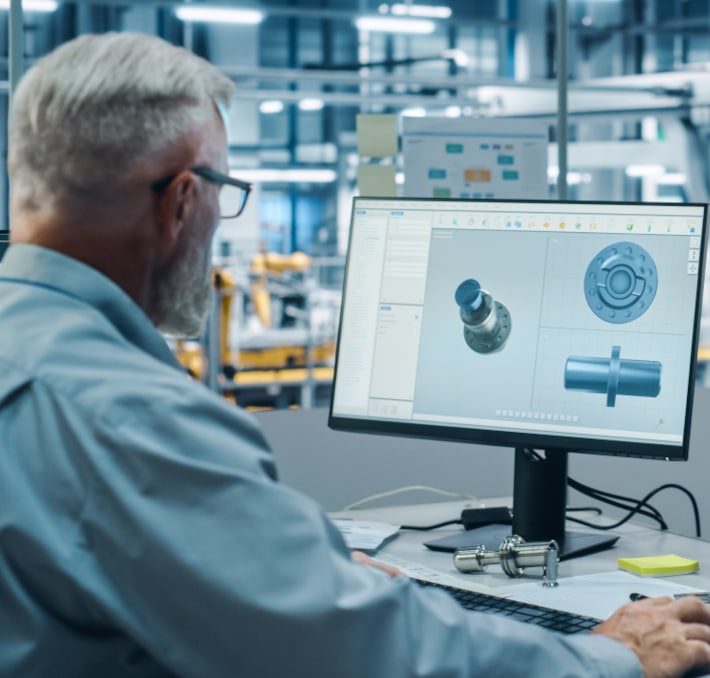
When a manufacturer designs a product, the data behind that design lives in dozens of places: CAD files on individual workstations, BOMs in spreadsheets, specifications in email threads, approval records in someone’s inbox. PDM software brings all of that into one system.
Think of it as a controlled library for your product data. Every file has a version history. Every change is logged. Every team member — from design engineering to production — pulls from the same source of truth. When something changes, the system tracks who changed it, when, and why.
That sounds straightforward, but the impact on day-to-day engineering work is significant. Engineers stop wasting time searching for the right version of a file. Approval cycles for engineering changes move through defined workflows instead of informal emails. Production teams stop building parts from outdated drawings.

Smart Manufacturing Report 2026

Get your copy of the Smart Manufacturing 2026 report to learn how manufacturing leaders are confronting the AI skills gap, integration complexities, and other operational challenges. Download today!

Two open booklets, the front displaying Smart Manufacturing 2026: Agile Leaders Confront the AI Skills Gap, with digital-themed blue graphics on the cover.

Core capabilities of a PDM system

PDM systems vary in scope and depth, but the core capabilities are consistent across modern solutions:

Who uses PDM software?

PDM is primarily used by discrete manufacturers — companies that design and build engineered products with defined part structures. The most common users are in industrial machinery, automotive supply, aerospace and defense, medical devices, and electronics manufacturing.
Within those companies, PDM touches several roles:
PDM is most commonly adopted by companies with 50 to 1,000 employees that have outgrown spreadsheets and shared drives but are not ready — or do not need — a full enterprise PLM system.

PDM vs. basic file storage: what’s the difference?

Shared drives and cloud file storage (SharePoint, Dropbox, OneDrive) can store CAD files. PDM systems manage them. The distinction matters more than it sounds.
A shared drive stores files. It does not know what a CAD assembly structure looks like, cannot enforce check-in/check-out to prevent simultaneous edits, does not track revision history in a way that is linked to part numbers and release status, and has no concept of an engineering change workflow.
PDM understands the relationships between files — which assembly references which part, which part drawing belongs to which revision, which BOM line corresponds to which CAD model. That structural understanding is what makes PDM useful for engineering teams rather than just IT teams.

When does a manufacturer need PDM software?

The trigger for PDM adoption is usually one of a handful of recurring problems:
Any one of these problems is a strong signal that a PDM system is overdue. When multiple are present at the same time, the cost of not having a system typically exceeds the cost of implementing one.
PDM and PLM are related but not the same thing. PDM focuses on product data — the files, documents, and change processes tied to the design of a product. PLM is a broader discipline that extends that management across the full product lifecycle, from concept through end-of-life. Many manufacturers start with PDM and expand to PLM as their needs grow.

FAQ

PDM stands for product data management. PDM software is a system that centralizes and controls the product-related data that engineering teams create and use — primarily CAD files, bills of materials, and technical documents.
PDM manages product data during the design and engineering phase — version control, CAD file management, BOM management, and engineering change processes. PLM (product lifecycle management) extends that management across the full lifecycle of a product, from concept through manufacturing, service, and end-of-life. PDM is often the starting point; PLM builds on top of it.
PDM software is used by discrete manufacturers — companies that design and produce engineered products with defined part structures. Common industries include industrial machinery, automotive supply, aerospace and defense, electronics manufacturing, and commercial equipment. Company size typically ranges from 50 to 1,000 employees, though larger enterprises also use PDM as part of a broader PLM environment.
PDM software is used to manage CAD files with version control and revision history, maintain engineering bills of materials, control engineering change processes (ECR, ECO, ECN), manage access permissions for product data, and integrate engineering data with ERP and other enterprise systems. The goal is to give engineering teams a single, controlled source of truth for all product-related data.
No, though CAD file management is a core part of what PDM does. PDM software manages CAD files within their broader product context — their assembly relationships, revision history, BOM connections, and engineering change workflows. A basic CAD file management system stores and organizes files without understanding the relationships between them.
Yes. Modern PDM systems like PRO.FILE integrate natively with all major CAD platforms — SolidWorks, Inventor, Creo, CATIA, and NX — managing data from multiple CAD environments in a single repository. This is particularly valuable for manufacturers who work with more than one CAD system or collaborate with suppliers and partners using different tools.
PDM systems integrate with ERP platforms (such as SAP, Oracle, and Microsoft Dynamics) to transfer released engineering BOMs into production planning without manual re-entry. The integration ensures that production always works from the correct, released revision of a part or assembly. Some PDM solutions use middleware or iPaaS platforms — such as the Revalize Integration Hub — to make this connection configurable rather than custom-coded.
On-premise PDM is deployed on the manufacturer’s own servers, giving the company full control over where product data is stored and who can access it. Cloud PDM is hosted by the vendor on shared or dedicated cloud infrastructure. On-premise is often preferred by manufacturers with strict data security requirements, ITAR compliance obligations, or limited internet connectivity at production sites. Cloud PDM offers lower upfront infrastructure cost and easier remote access.

PRO.FILE's Blogs

Two open booklets, the front displaying Smart Manufacturing 2026: Agile Leaders Confront the AI Skills Gap, with digital-themed blue graphics on the cover.

Smart Manufacturing Report 2026

Get your copy of the Smart Manufacturing 2026 report to learn how manufacturing leaders are confronting the AI skills gap, integration complexities, and other operational challenges. Download today!